Why Server Location Still Matters Even With a CDN
So, you’ve set up a CDN and noticed your site is zooming along—mostly. But here’s the thing: speed isn't actually hitting every visitor equally. You might notice that someone living right next to your origin server still gets a snappy "time-to-first-byte" (TTFB), while others feel a slight lag. That’s not because your CDN is broken. It’s a simple reminder that while a CDN is great at delivering cached files, it doesn’t magically move the actual server where your site is built and powered.
What a CDN Actually Speeds Up (and What It Doesn't)
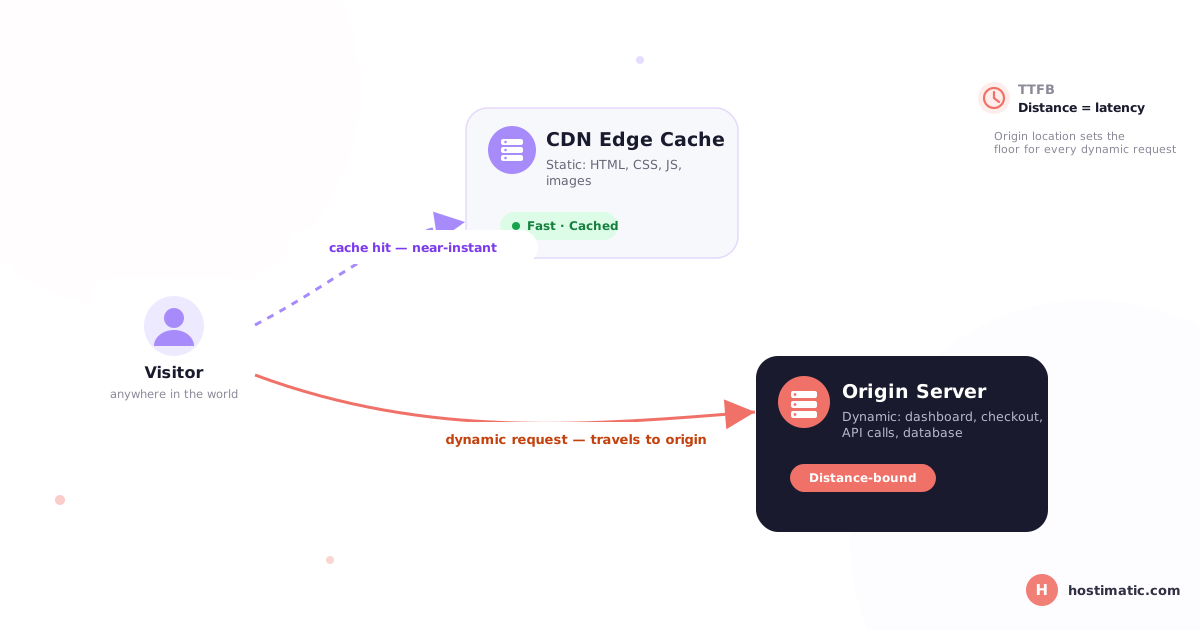
Think of a CDN as a global network of high-speed couriers. It copies your static stuff—like images, CSS, and JS—to "edge" servers all over the world. This means a visitor in Singapore doesn't have to wait for a file to travel all the way from Virginia. However, the CDN doesn't touch your application logic or your database. Those stay put at your origin server, and they have to do the heavy lifting every time someone makes a request that hasn't been cached yet.
That’s why saying "we use a CDN" isn't quite the same as saying "our site is fast for everyone." It’s more accurate to say your static assets are fast. The core experience of your site still relies heavily on where that origin server is actually sitting.
Why Server Location Still Matters With a CDN in Place
Here is where things get real: every time a user does something "dynamic"—like logging into a dashboard, searching for a product, or hitting the checkout button—the CDN steps aside. That request has to travel all the way back to your origin. If your server is in New York and your customer is in Dhaka, they’re going to feel that physical distance. Once you add database queries into the mix, you're stacking up delay after delay before the user sees a single thing on their screen.
Plus, anything that involves a unique session or a "no-cache" header has to go straight to the source. If you're running a simple blog, this might not be a huge deal. But if you’re running a SaaS app or a busy e-commerce store, most of your traffic is going to be hitting that origin server directly.
TTFB and Dynamic Requests: Where Location Shows Up
When we talk about TTFB, we're talking about the moment your server says "I'm here!" to a browser. Network distance is the biggest factor here. Even through fiber optics, data can only travel so fast. Sending a request across an ocean adds a hundred milliseconds of pure travel time before your server even starts "thinking." A CDN helps with the finishing line, but it can't shorten the track for those vital requests that need to reach the origin.
This is why basic speed tests can be a bit of a trap. Your homepage might look lightning-fast because it's cached perfectly on an edge node, but your actual application—the part where people spend money or do work—might be dragging because of the server's physical location.
How to Choose (or Fix) Your Server Location
The best place to start is by looking at where your actual, paying customers are located. Don't worry about total traffic—worry about your target market. You want your origin server and your database to be right in the middle of that action, rather than just picking the "default" location your host offers.
Don’t just test your homepage. Use tools like WebPageTest to check the TTFB on a logged-in page from the specific region you're targeting.
Keep your app and your database in the same room. A fast server doesn't mean much if it wastes time talking to a database halfway across the country.
Get specific with your hosting. Look for providers like Hostimatic that clearly state exactly which datacenter your VPS or dedicated server will live in, so you aren't just guessing.
If you have a truly global audience, you might need to look into multi-region setups or database replicas. A CDN is a great tool, but it shouldn't be the only one in your kit.
The Bottom Line
At the end of the day, a CDN is a must-have—it does incredible work for static content. But it's an extra layer, not a replacement for a well-placed server. If your dynamic pages are feeling sluggish, the answer usually isn't a "bigger" CDN plan; it's making sure your server is sitting exactly where it needs to be.
FAQ
Does using a CDN mean server location doesn't matter anymore?
Not at all. While a CDN is great for static files, things like your database, user sessions, and dynamic logic still live on the origin. If that server is far away, those parts of your site will still be slow.
What is TTFB, and why does it matter if I already have a CDN?
TTFB is basically the "reaction time" of your server. Even with a CDN, any request that isn't already cached has to travel to your origin. The further away that server is, the longer that reaction takes.
Do logged-in users get the same speed benefit from a CDN as anonymous visitors?
Usually, they don't. Because logged-in pages are personalized (showing the user's name or specific data), they can't be easily cached on a CDN edge. That means the origin server has to build those pages from scratch every time.
How can I tell if server location is actually hurting my site's performance?
The best way is to run a TTFB test on a dynamic page (like a search or checkout page) using a tool that lets you test from the same region where your users live.
Should my server be close to my users or close to my database?
Try for both! If your server is close to your users but far from your database, you’re just swapping one delay for another. Keeping them in the same datacenter is usually the winning move.
Does server location affect SEO, or just user experience?
It definitely affects both. Google uses page speed as a ranking factor, and since TTFB is a huge part of that, a poorly placed origin server can actually pull down your search rankings.